
When you populate a Kubernetes cluster from Infrastructure-as-Code — Terraform, Helm, or plain manifests — the hardest recurring question is: how do you keep secrets out of places they don't belong? Database passwords, API tokens, certificates. They need to land inside the cluster, but everything in between (git, state files, CI pipelines) should never see them in plaintext.
This article walks through a setup we have used across projects: encrypted secrets stored next to your code in git, decrypted only inside the cluster. It uses SOPS, the sops-secrets-operator, and age for key management.
The problem with naive approaches
Storing secrets as plain text in a git repository — even a private one — multiplies their blast radius. Every person with repo access, every backup, every CI runner that clones the repo now has the password.
Terraform makes this worse. Its state file tracks deployed resources including kubernetes_secret values. Remote state (S3, GitLab) leaks secrets to additional storage layers. Even in-memory plans can expose sensitive data in CI logs.
Research on the right fix is tedious because there are many options:
- Cloud-provider vaults (AWS KMS, GCP KMS, Azure Key Vault): strong, but tie you to one provider, cost money, and decouple secret rotation from code deployment.
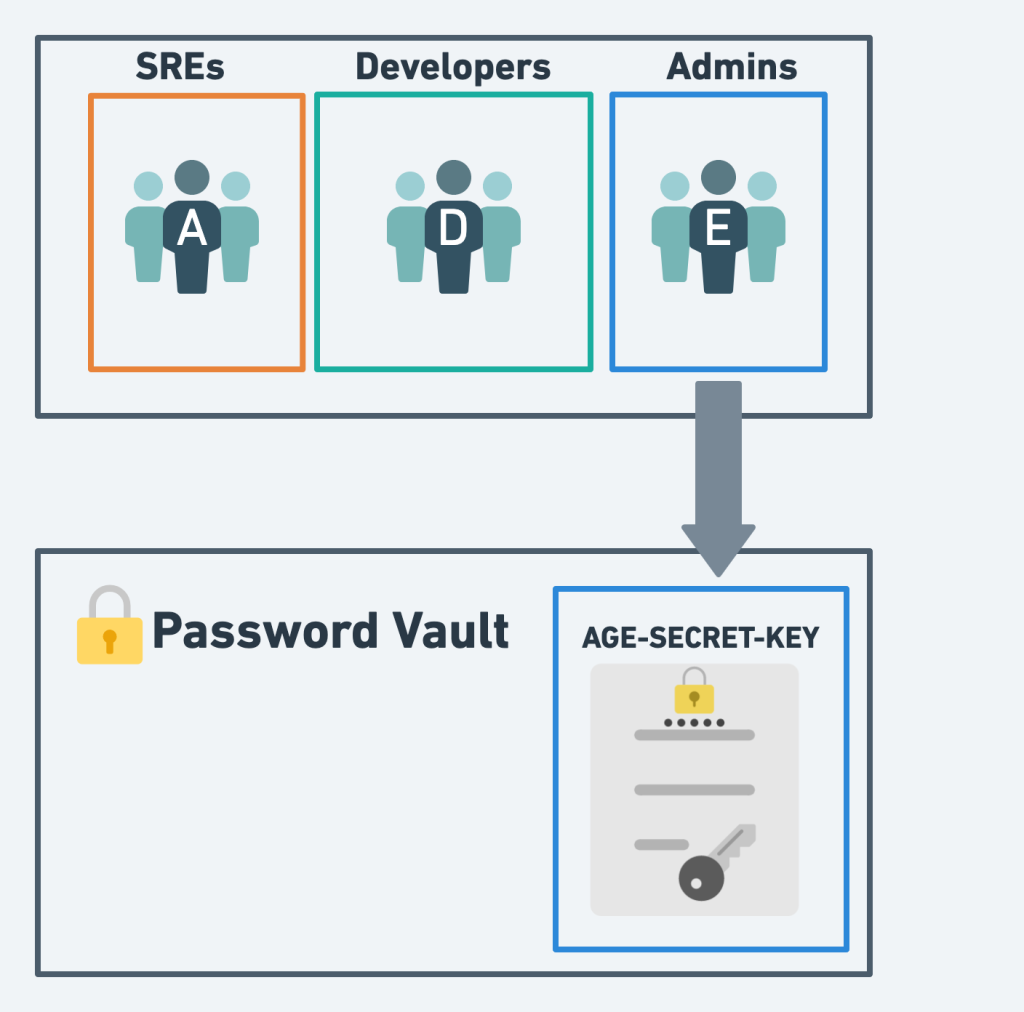
- Ops-team password vaults (1Password, Bitwarden): good for humans, bad for automation.
- GitOps with encryption at rest: keep encrypted secrets next to code, decrypt at deploy time. This is what SOPS-Operator does.
What SOPS and sops-secrets-operator do
SOPS is a Mozilla-maintained tool that encrypts and decrypts YAML, JSON, ENV, INI, and binary files. It can use AWS KMS, GCP KMS, Azure Key Vault, age, or PGP as backends.
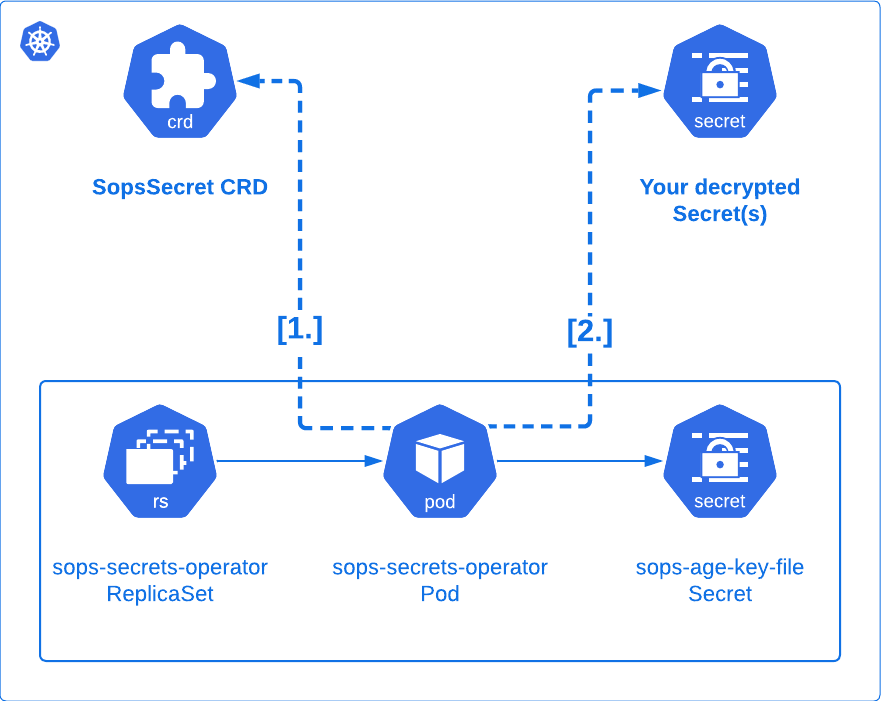
The sops-secrets-operator extends this mechanism into Kubernetes. It introduces a Custom Resource Definition called SopsSecret. You store an encrypted SopsSecret manifest in git. The operator watches for it, decrypts its sensitive fields, and reconciles regular Kubernetes Secret resources from them. Your pods consume those secrets normally — nothing changes from their perspective.
Why age, not PGP
age is a small encryption tool written by a Google engineer in 2019. It deliberately solves one problem — file encryption — and avoids the sprawling feature set (and attack surface) of PGP/GnuPG.
Compared to GPG, age:
- Has a fraction of the feature set and code size.
- Does not carry 20+ years of legacy modes and compatibility traps.
- Uses modern primitives (X25519 asymmetric encryption).
- Has a simpler key lifecycle (
age-keygenproduces one identity file).
Mozilla recommends age over PGP for SOPS. We agree for this use case.
Keys in age:
- Identity (private key, starts with
AGE-SECRET-KEY-): belongs in a password vault. Whoever holds it can decrypt. - Recipient (public key, starts with
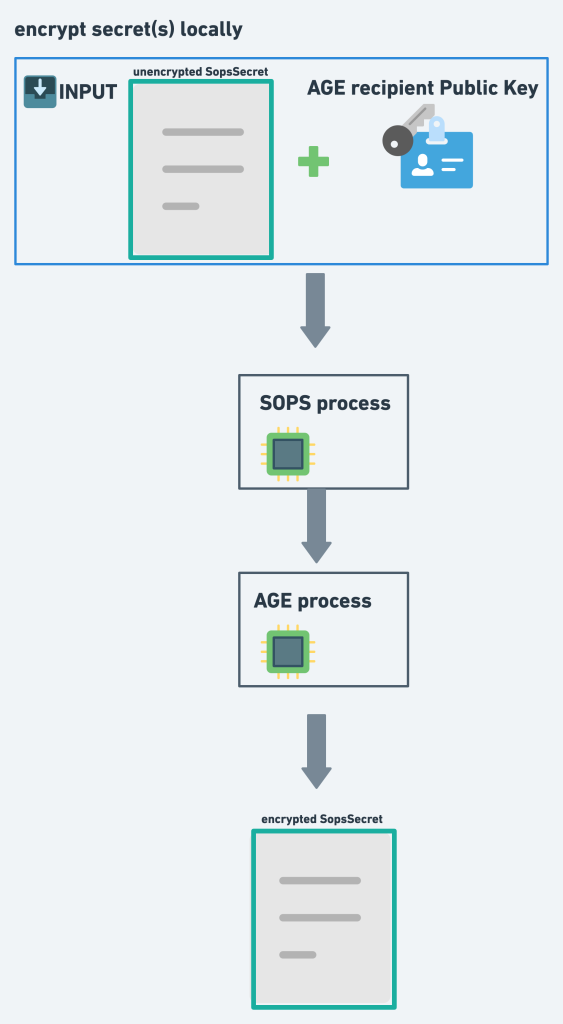
age): safe to commit. Encrypt to it.
Encryption and decryption flow
Local encryption (what a developer does before committing):
In-cluster decryption (what the operator does continuously):
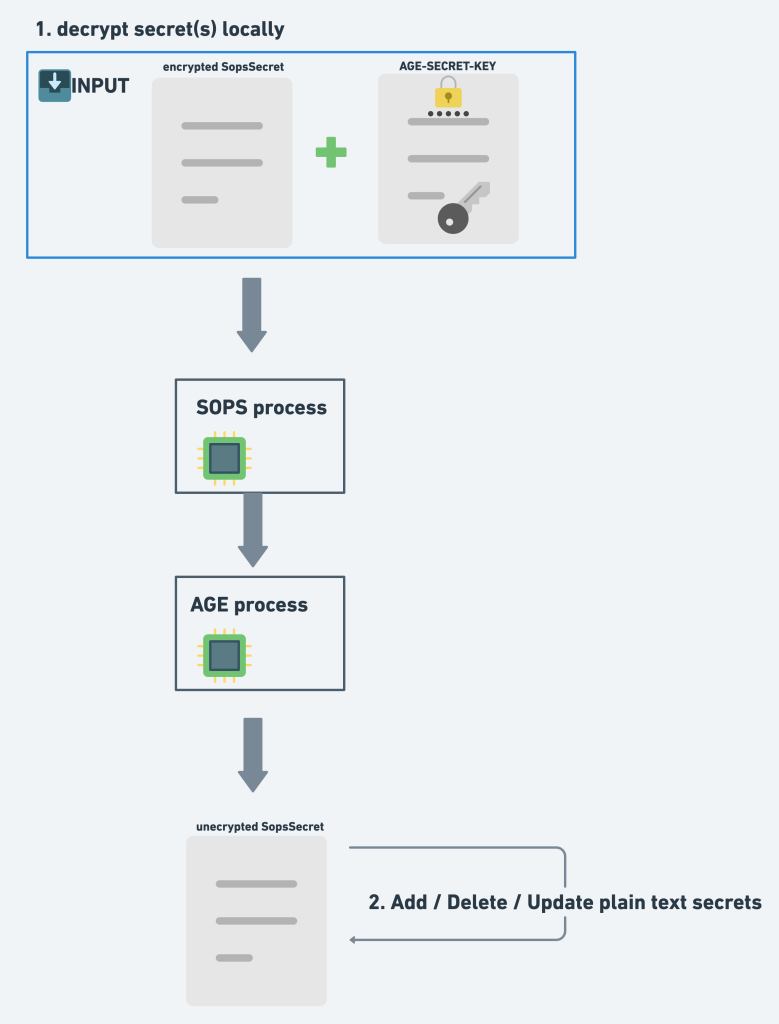
The operator needs exactly one secret: the age identity, mounted into the sops-secrets-operator pod. Everything else in git is encrypted.
Step-by-step setup
1. Generate an age keypair
age-keygen -o age-key.txt
The file contains both the recipient (public, as a comment) and the identity (private). Store a copy in your team's password vault immediately.
2. Bootstrap the age identity into the cluster
Base64-encode the identity:
sed -n -e '/^AGE-SECRET-KEY/p' age-key.txt | base64
Create the secret via kubectl (not Terraform — otherwise the identity ends up in your state file):
apiVersion: v1
kind: Secret
metadata:
  name: sops-age-key-file
  namespace: YOUR_NAMESPACE
type: Opaque
data:
  key: YOUR_BASE64_ENCODED_IDENTITY
3. Install sops-secrets-operator
Via Helm:
helm repo add sops https://isindir.github.io/sops-secrets-operator/
helm upgrade --install --create-namespace sops sops/sops-secrets-operator \
  --namespace YOUR_NAMESPACE
Or via Terraform:
resource "helm_release" "sops_secrets_operator" {
  name             = "sops-secrets-operator"
  chart            = "sops-secrets-operator"
  repository       = "https://isindir.github.io/sops-secrets-operator/"
  namespace        = "YOUR_NAMESPACE"
  version          = "0.14.0"
  create_namespace = true
  values = [
    <<EOF
extraEnv:
  - name: SOPS_AGE_KEY_FILE
    value: /etc/sops-age-key-file/key
secretsAsFiles:
  - mountPath: /etc/sops-age-key-file
    name: sops-age-key-file
    secretName: sops-age-key-file
EOF
  ]
}
4. Write and encrypt a SopsSecret
apiVersion: isindir.github.com/v1alpha3
kind: SopsSecret
metadata:
  name: app-secrets
  namespace: YOUR_NAMESPACE
spec:
  secretTemplates:
    - name: app-secrets
      stringData:
        DATABASE_PASSWORD: supersecret
        API_TOKEN: also-supersecret
Encrypt with SOPS, using the age recipient:
sops --encrypt \
  --age 'YOUR_AGE_RECIPIENT_PUBLIC_KEY' \
  --encrypted-suffix Templates \
  app-secrets.yml > app-secrets.enc.yml
--encrypted-suffix Templates tells SOPS to only encrypt fields inside secretTemplates, leaving surrounding metadata readable in git.
5. Deploy to the cluster
Directly:
kubectl apply -f app-secrets.enc.yml
Or convert to a Terraform resource:
cat app-secrets.enc.yml | tfk8s --strip -o app-secrets.tf
Then terraform apply as usual. Install sops, age, and tfk8s via your package manager (for example brew install sops age tfk8s).
6. Verify
kubectl get secrets app-secrets -n YOUR_NAMESPACE -o yaml
If the secret is missing, check the operator logs:
kubectl logs -l app.kubernetes.io/name=sops-secrets-operator -n YOUR_NAMESPACE
Typical workflow once set up
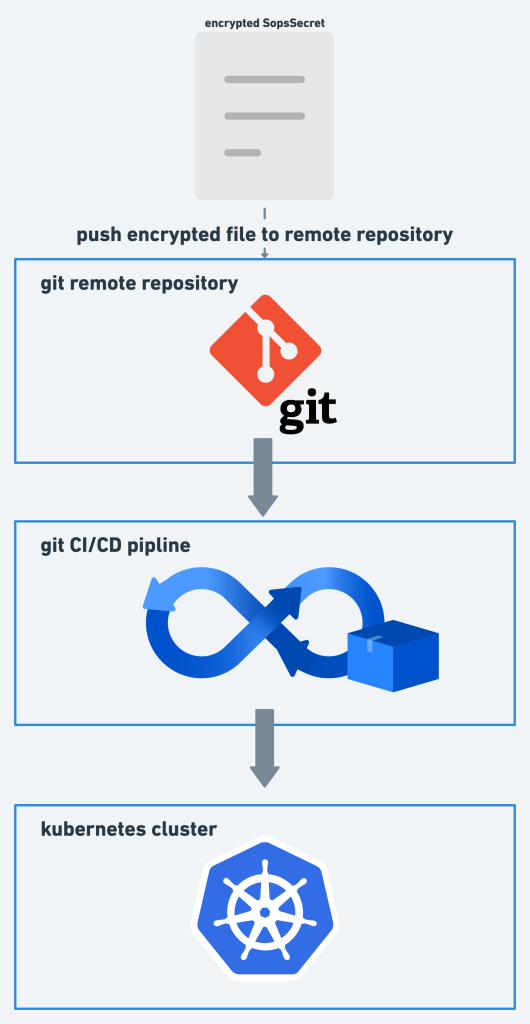
Day to day, changes to secrets look like any other PR. A developer runs sops locally to edit an encrypted file, commits, and pushes. The pipeline applies manifests to the cluster, and the operator handles the decryption.
To edit an existing encrypted file:
export SOPS_AGE_KEY_FILE=./age-key.txt
sops app-secrets.enc.yml
SOPS opens your $EDITOR, you edit plaintext, and SOPS re-encrypts on save.
What this approach does not solve
- Cluster-level access control. Anyone with
kubectl get secrets -o yamlpermission still reads plaintext from inside the cluster. Pair this with RBAC and audit logging. - Terraform referencing decrypted secrets. If you
data.kubernetes_secretthe decrypted value in another Terraform resource, it flows back into state. There is no clean fix as of today — avoid the pattern when you can. - Key rotation. When the age identity is compromised, you re-encrypt every
SopsSecretin git with a new recipient and roll the cluster's identity secret. Plan for this before you need it.
Conclusion
Handling secrets well is one of the hardest problems in operating production systems. SOPS-Operator with age keeps plaintext out of your repositories, state files, CI logs, and cloud-provider storage, while preserving the Kubernetes Secret abstraction your workloads expect. The setup is a single afternoon of work and pays back across every deploy.