
In short: Yes. AI translates spoken or typed input into structured data and actions, such as a customer lookup, an article match, or a draft quote in the ERP. The bottleneck is not speech recognition, but understanding intent and connecting cleanly to your systems. Critical details such as article numbers are confirmed and checked against master data.
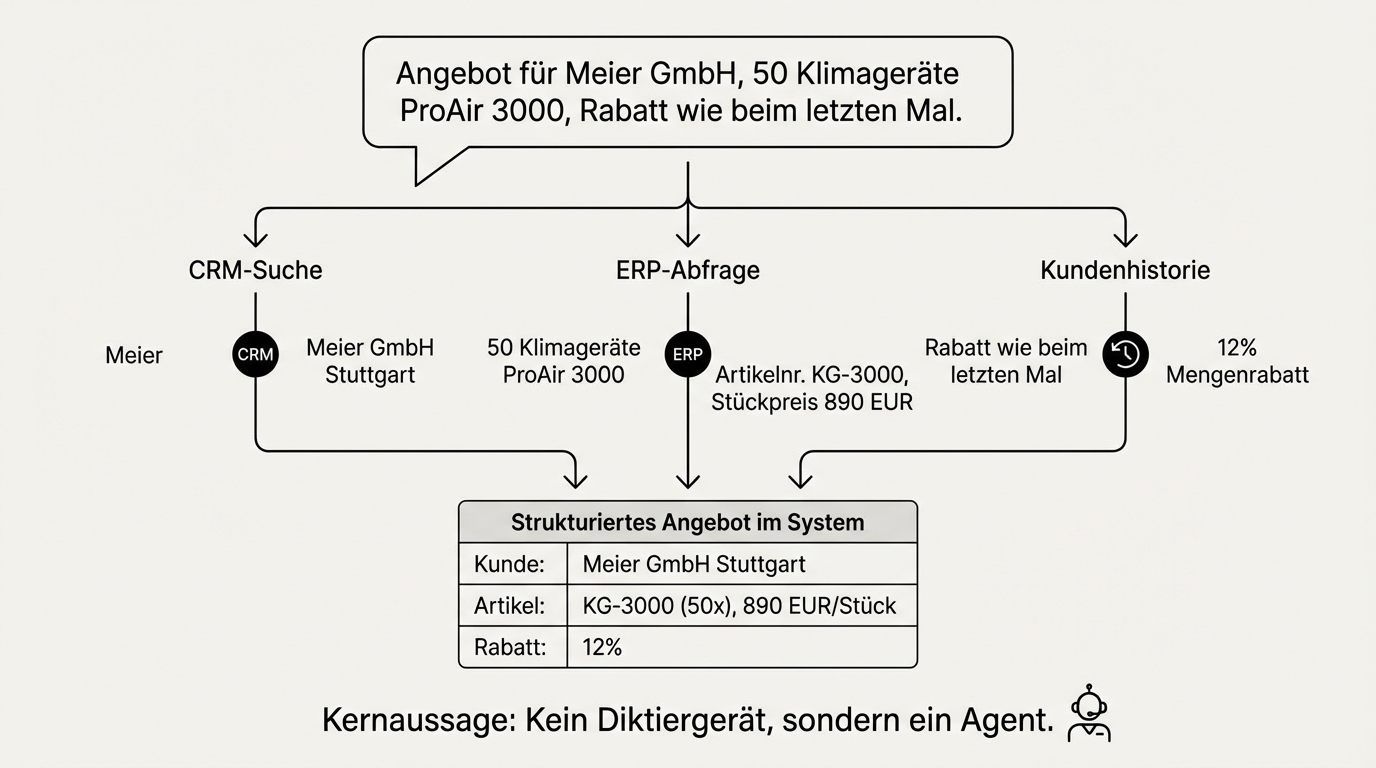
A sales rep comes out of a client meeting, picks up their phone, and speaks: "Quote for Meier GmbH, 50 climate units model ProAir 3000, delivery by end of June, discount same as last time." A few minutes later, a structured quote sits in the system. The article number was looked up in the product catalogue, the discount pulled from the customer history, the delivery date checked against current stock.
This is not a future vision. It works today because over the past two years, the way business software processes input has fundamentally changed. Instead of filling out forms, instead of navigating the right screen in the right sequence, you speak or type in natural language. AI translates that into structured data and actions.
The real capability is not speech recognition
When people think about voice input in business software, they think of speech recognition first. Microphones, transcription, dialects. That's the wrong starting point. Speech recognition is a solved problem. Current models recognise regional accents as reliably as standard pronunciation, and even domain-specific terminology can be corrected through a post-processing step that reconciles the transcript with a specialised glossary.
The real capability is something else: understanding natural language and translating it into structured actions. "Quote for Mueller" becomes a customer lookup. "200 units Classic" becomes an article assignment. "Discount same as last time" becomes a customer history query. This isn't a dictation device -- it's an agent that understands what's meant and acts on it.
Voice and text are interchangeable input channels
An insight that has solidified across our projects over months: voice and text are simply different input channels for the same agent. The language model is, at its core, a user interface. Behind it run the same backend agents, the same business logic, the same system integrations. Whether someone types a request or speaks it makes no difference to the system.
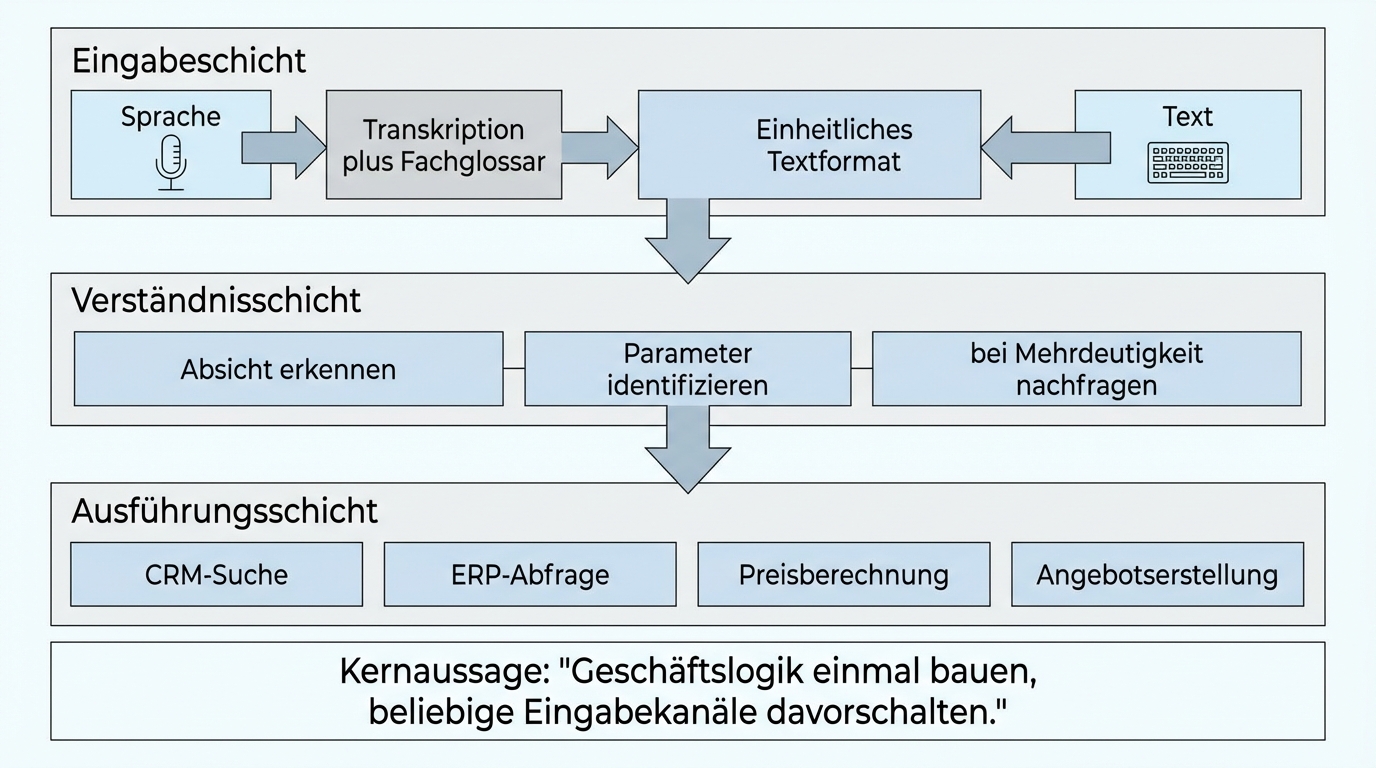
This fundamentally changes project planning. You don't build a voicebot first and then a chatbot. You build the business logic once and then put any input channel in front of it. An agent that processes written requests can, with manageable effort, also be operated by voice. The reverse works just as well.
In practice, this means: if a system works via chat, the step to voice input is not a new project -- it's an extension of the existing one. The investment in business logic pays off twice over.
Where voice input beats forms
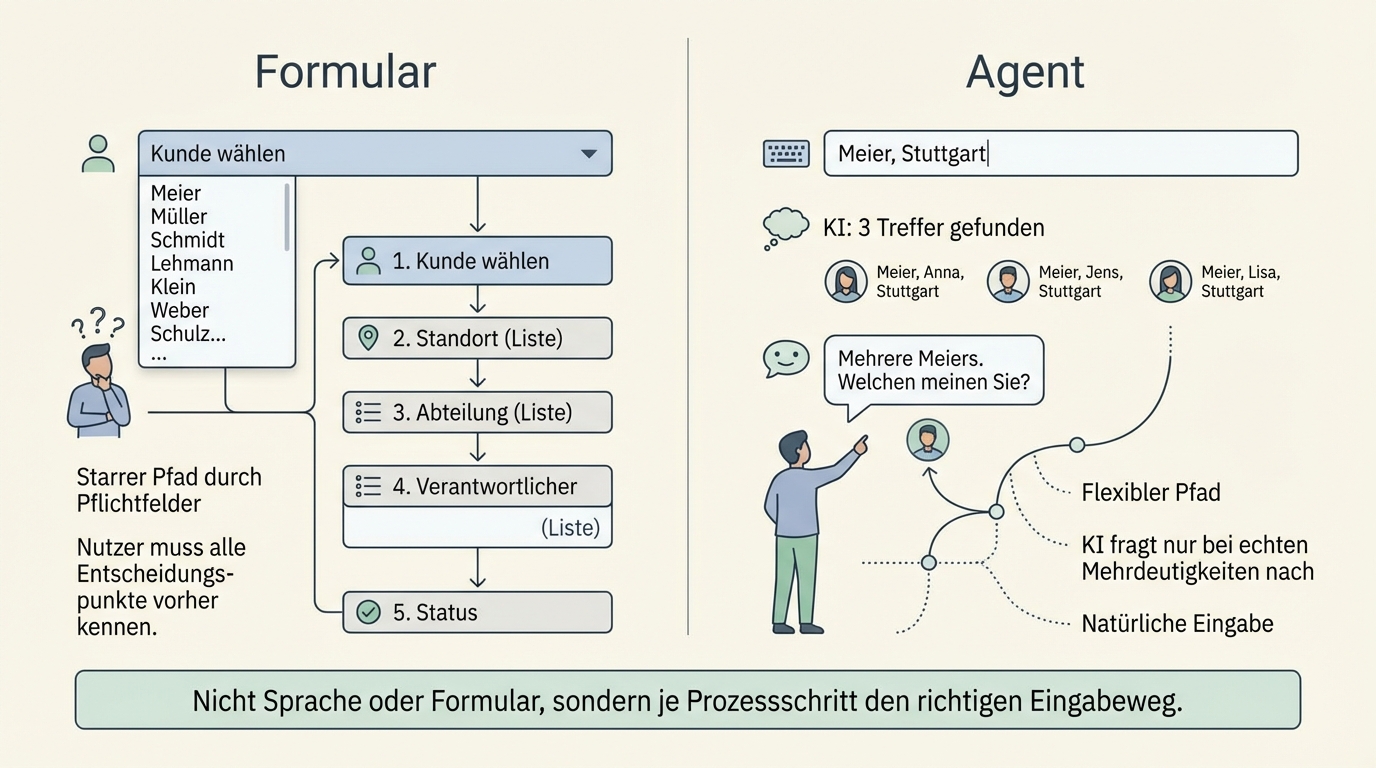
Forms force the user into a predefined structure. That works as long as the input is unambiguous. But many business processes are not unambiguous.
"Create a quote for Mueller." Which Mueller? A form would need a dropdown with all customers named Mueller. Or a search field with filters. The user would need to know that they first have to search for the customer, then verify the address, then select the product category. An agent with access to customer data finds eight matches, infers from context that it's probably Mueller GmbH in Stuttgart, and only asks when it's genuinely unclear.
Voice input works especially well wherever a process has decision points that aren't all known in advance. A form has to anticipate every possible path. An agent can react flexibly, ask follow-up questions, and use context to make the right decision.
The flip side: for structured, predictable input, a well-designed form remains more efficient. The question is not "voice or form" but "where in the process does each input method pay off?"
The most common use case: automating standard requests
The most obvious application is repetitive standard requests. Price and delivery time enquiries by phone, standard support questions, recurring orders. At one industrial company, we found that the majority of incoming calls had the same structure: customer states article number, asks about price and availability.
Automating such requests works because they are predictable. The AI understands the request, asks for clarification when needed, reconciles the information against the ERP system, and delivers an answer. The employee is freed from repetitive work and can focus on the complex cases that genuinely require human judgement.
Experience shows: companies that automate standard requests don't just gain time. They also gain capacity for the cases that make the difference against the competition.
Knowledge becomes tangible because AI demands it
A side effect that turns out to be one of the most valuable: introducing natural language as an input channel forces organisations to articulate their implicit knowledge.
When a sales rep simply speaks their request and the system is supposed to make the right decision, the system has to know what the right decision looks like. What discount tiers exist? Under what conditions does which price apply? Which products are compatible? In many companies, all of this is knowledge that lives in the heads of individual people but is documented nowhere.
AI forces this documentation because it cannot make good decisions without explicit rules. More on this in Digitising expert knowledge with AI. This isn't a documentation project in the classic sense -- one that runs alongside daily operations and eventually becomes outdated. It's a knowledge base that is actively used and gets better with every correction.
What voice input is not: a universal default path
Voice input in an open-plan office doesn't work. Too loud, too little privacy, socially inappropriate. In a home office or in the car, on the other hand, it's the most natural input method. The decision for or against voice input is not a technology question -- it's a context question.
There is also a generational component: people who are used to communicating via voice messages find voice input in software natural. People who mostly type prefer the chatbot. A good system offers both and leaves the choice to the user.
When AI mishears: confirmation instead of blind trust
What happens when speech recognition gets an article number wrong? When "156755" suddenly becomes "156756" and the wrong product ends up in the quote?
The solution is the same one a good call centre employee would use: confirmation of critical information. "Did I get that right -- article number 156755?" On top of that, the AI checks semantically whether the recognised number matches the described product. If a customer asks for a climate unit but the recognised article number leads to a heating controller, there is clearly an error.
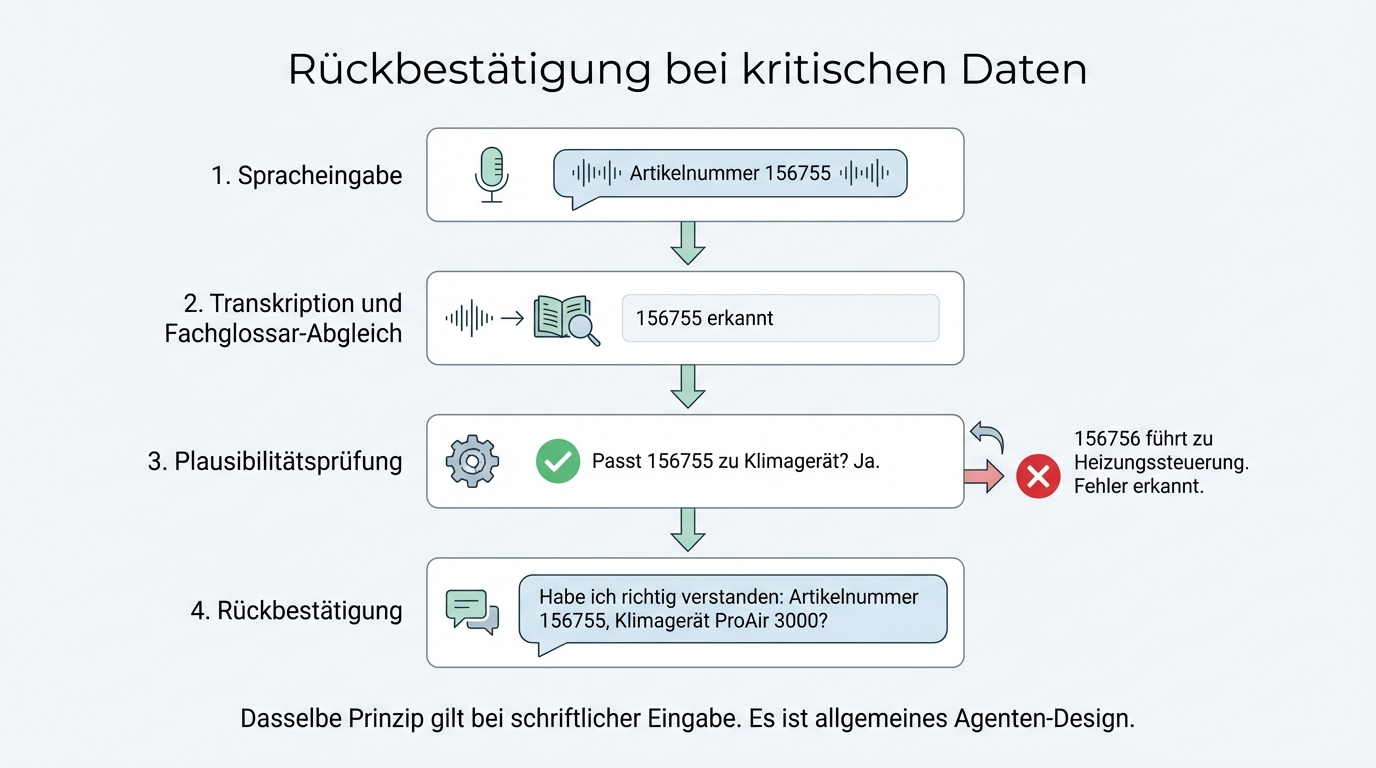
This is not a voice-specific problem. It's general agent design: important information is confirmed and plausibility-checked. The same principle applies to written input when a user makes a typo.
How accurate is AI transcription with technical terms?
Current models recognise everyday language and dialects reliably. Errors cluster elsewhere: in product names, article numbers, abbreviations, and technical terms that rarely occur in general usage. Yet in a business context, these are often the most important words.
Three measures bring accuracy to a level you can work with:
Domain glossary in post-processing. The transcript is matched against a glossary of your own products, customers, and technical terms. A phonetically similar word becomes the correct product name.
Context from your systems. If the agent knows which customer is involved, it also knows their typical products. Input that matches no article in the catalogue is not accepted but questioned.
Confirmation for numbers. Article numbers, quantities, and prices are confirmed before further processing, as described above.
The same applies to meeting transcription, for example after technical customer meetings: as a basis for summaries and task lists, the transcript is usually good enough. Numbers and technical terms that are carried over into a quote or a system should be checked first.
Data protection: pragmatic, not perfect
Voice processing in a business context has a legal dimension. Voice data is biometric data under GDPR and requires conscious handling.
In practice, a pragmatic approach has proven effective: voice data is deleted immediately after transcription. No audio is stored, only the transcribed text. This significantly reduces the data protection attack surface, because biometric characteristics can no longer be derived from a transcript.
For meeting transcriptions, an additional rule applies: always ask beforehand. Experience shows that acceptance is high when you communicate transparently that the meeting is being transcribed, not recorded. "We use the transcription so we can process the meeting outcomes more effectively" is an argument that works in practice with clients of all sizes.
The architecture: three layers, cleanly separated
Building a natural language interface for business software requires three layers:
Input layer: Voice or text is converted into a uniform text format. For voice, this means: transcription, post-processing with a domain glossary, optionally confirmation of critical data. For text, this step is skipped.
Understanding layer: The agent interprets the input, determines the intent, and identifies the relevant parameters. "Quote for Mueller, 200 units Classic" becomes: action = create quote, customer = Mueller GmbH, product = Classic, quantity = 200. In cases of ambiguity, the agent asks.
Execution layer: The agent carries out the identified action and is connected to your existing business systems for this. Customer lookup in CRM, article query in ERP, price calculation, quote generation. This layer is identical regardless of whether the input came via voice or text.
The clean separation of these layers is the key to maintainability. If speech recognition improves, you swap out the input layer. If a business process changes, you adjust the execution layer. The layers don't affect each other.
Not everything needs voice
Voice input is a tool, not a goal. Some processes benefit from it, others don't.
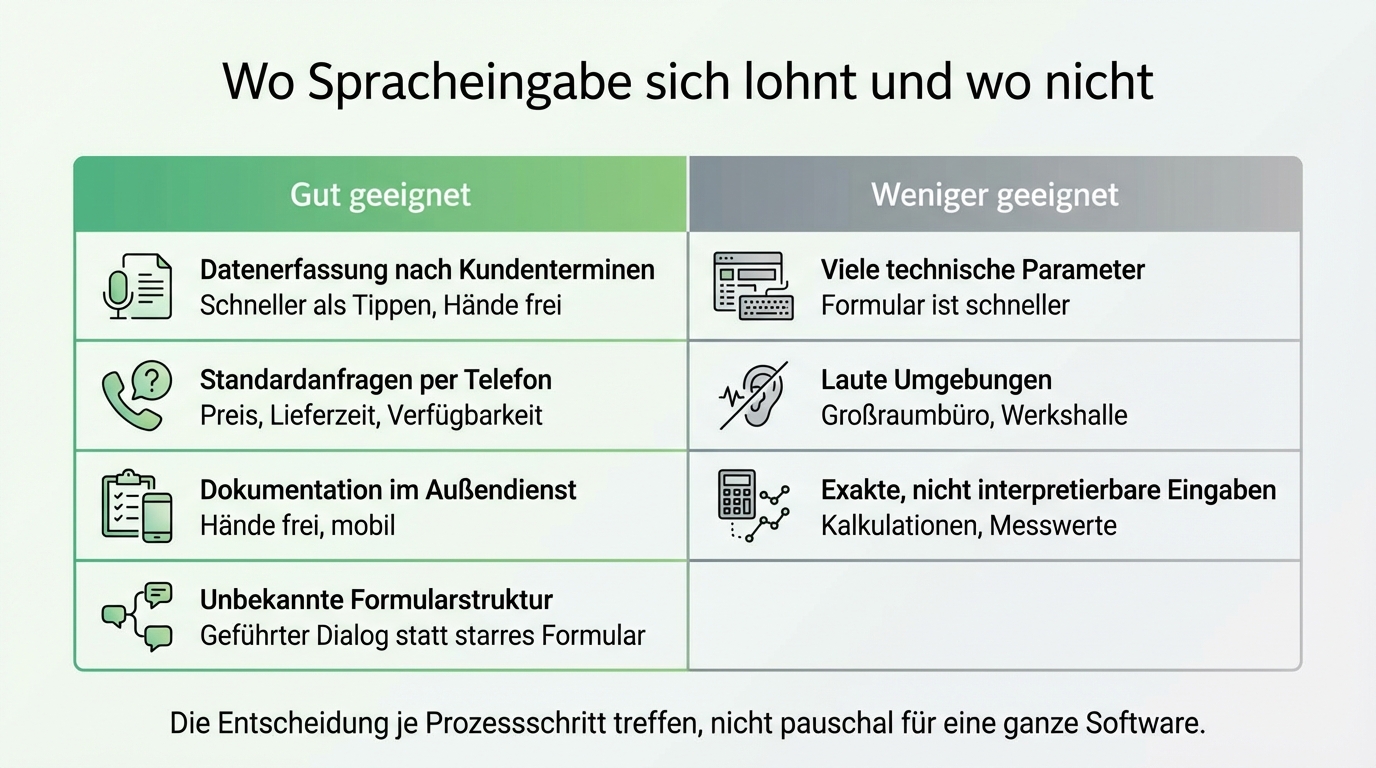
Well suited: Data capture after client meetings (faster than typing), standard enquiries by phone (price, delivery time, availability), documentation in the field (hands free), and situations where the user doesn't know which fields to fill in (guided dialogue instead of a rigid form).
Less suited: Highly structured input with many technical parameters (a form is faster), noisy environments, and processes where input must be exact and not open to interpretation (e.g. calculations).
The decision should be made per process step, not across an entire piece of software.
Frequently asked questions about AI voice input
Can I create a quote in the ERP directly by voice?
Yes. The agent identifies customer, articles, quantities, and terms from the voice input, retrieves the data from CRM and ERP, and creates the quote as a draft. An employee reviews and approves it. How to automate the entire quoting process is described in How AI transforms the proposal process.
Do I need a separate voicebot project for voice input?
No. Voice is just another input channel for the same agent that also handles written requests. If a system works via chat, voice input is an extension, not a new project.
Can voice input be GDPR-compliant?
Yes, with deliberate handling. Voice data counts as biometric data. A proven approach is to delete the audio immediately after transcription and only process the text. For meeting transcriptions, participants are asked beforehand.
Which processes benefit from voice input?
Data capture after customer meetings, standard enquiries by phone, documentation in field service, and guided dialogues where the user doesn't know which fields to fill in. For highly structured input with many technical parameters, a good form remains faster.
Who implements voice input for ERP and CRM?
Deyan7 builds AI agents that understand natural language and carry out actions in existing systems such as ERP and CRM. We build the business logic once and put text and voice input in front of it as equal channels.
The next step
In a first conversation, we clarify where in your processes information is currently typed up laboriously or transferred into forms, and which systems need to be connected for this. Afterwards you'll know whether voice input offers real leverage for you or whether a different starting point makes more sense.